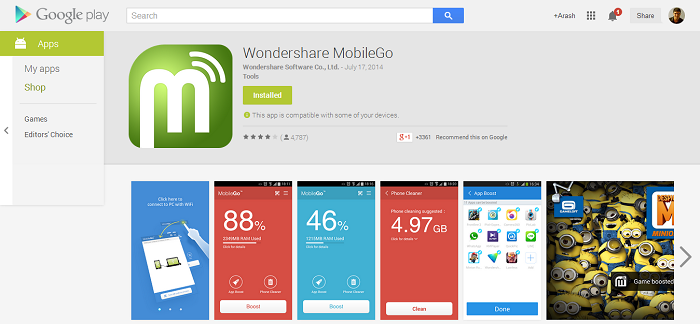
I used to be on Sprint and had the Google Voice integration which was something I really liked. The main reason was that I could easily get my SMS messages on my phone but also on my computer. Since I spend a lot of time in front of a computer, it’s made writing and responding to messages much easier. It also meant that all my SMS messages were backed up to the Google cloud and I never had to worry if I switched to a new phone. But recently I switch to At&t and the hunt was on for a Google Voice replacement that could replicate as a full SMS manager on my computer. Today I’m going to cover MobileGo software and app which does all that and more.  MobileGo is a full SMS manager for your Android phone and much more. First let’s go over how it all works which is a fairly easy process. You’ll need to first download and install the MobileGo for Android application for you PC and install it. You’ll also want to install the MobileGo app for your Android as well. Then open application on your PC and proceed to connect your phone. You can connect it via USB or a much easier way is through WiFi which is shown right on the app. Once connected then you’re ready to go.


MobileGo is a full SMS manager for your Android right on your PC. That mean you get access to all your SMS messages from the SMS menu on the left. You scroll through all your previous message and click on any person to view their message. Using the menu at the top (see gallery above) you have the option to delete any single message. You can use the import/export option to save messages from a single person or save all of your messages. Therefore this is a great way to backup all your SMS messages and later restore if you’re moving to a new phone or a new carrier. It’s also not bad to just backup your messages every once in a while. You can start a new message by using the New option on the top menu. The To field will automatically populate with your contact addresses.


But besides SMS managing, the MobileGo app is so much more. You get full access to all the files on your Android phone. So now you can easily view files, images, and videos from your phone right on your computer. You can also export any file, picture, or video from your phone to your PC. So retrieving those images and saving them on your computer never has been easier. Besides file managing your can also view all your applications with the option to uninstall or install new apps. Other great features include notification on your PC for low battery, full charge and SMS notifications. The application also has a built-in memory manager to help clear out high memory usage and keep your Android running smooth. Definitely lots of great features in this application. I love getting my SMS messages on my computer and being to manage it all right from my PC. If you try it I’m sure you will see the benefits as well. Checkout the software and Wondershare and let us know what you think. MobileGo is not the only one choice for android sms manager. If you’d like to know other similar programs, you can check here.




Leave a Reply