In most cases when we but an electronic device, like a phone or tablet, we are always on the lookout for an update. We want the latest update to fix bugs and add features. But there are certain cases where an upgrade can be bad. Take into an account when an upgrade screws up an app that you really like or just all together makes your device function badly. Another scenario would be if you have rooted your device in which case an update will remove the root. That’s the definitely the case with the Kindle Fire HD and HDX in which root is really useful to install Google Play Store. So in that case you’ll want to block all update from Amazon. Here is an easy way to take care it in no time.
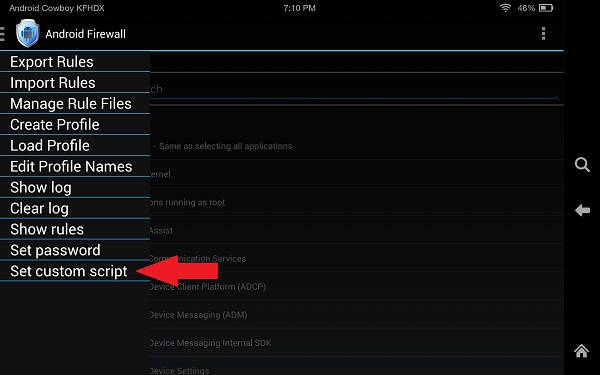
First you’ll need the Android Firewall app which you can get from here. Download and transfer this app to your Kindle then use a file explorer app to find the file and tap to install. Next open the app and go into the setting on the left and choose “Set custom script”.
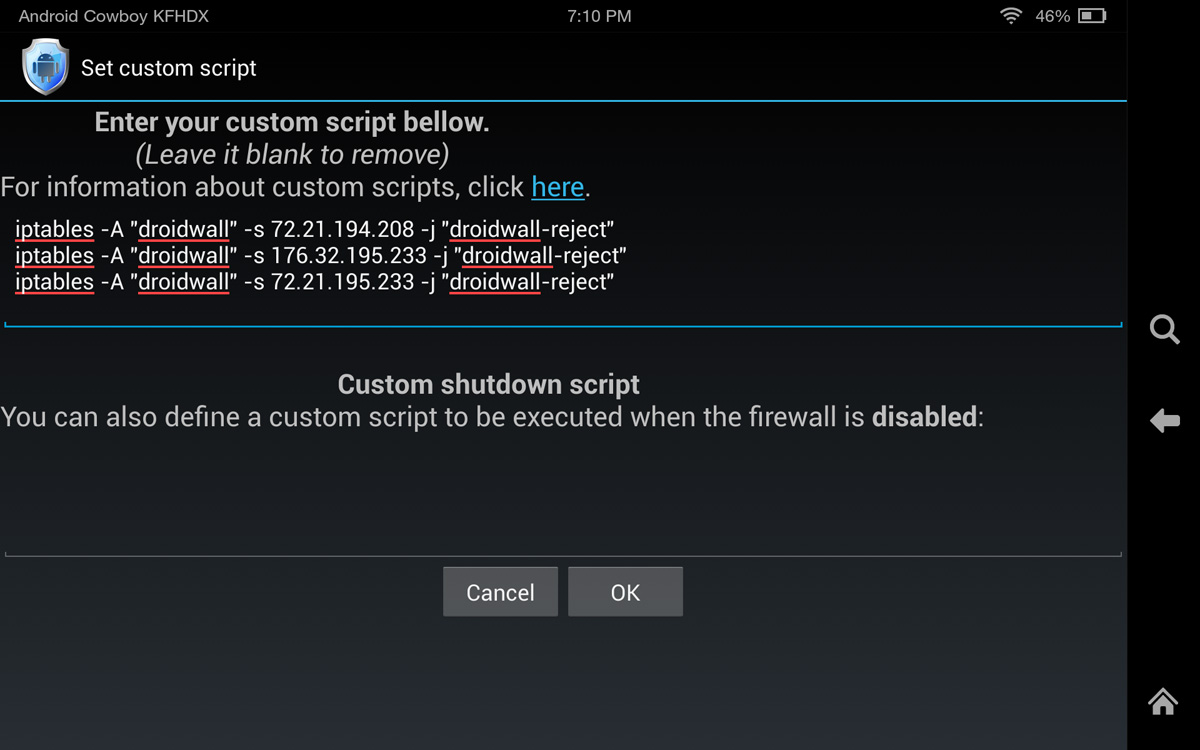
Enter the following info then tap okay. That’s it you are now protected from update. Enjoy your rooted Kindle Fire device.


Leave a Reply