I’m sure we have all been there at some point when we have either lost or can’t find our phone or tablet. It could be somewhere in the house or maybe it was lost last night along with other things you don’t remember. In these cases you want to protect your data and being able to locate or remote wipe is very important. There are definitely apps that will do this but Google has finally released their own software called Android Device Manger. It’s a simple Google Maps type interface that let’s your locate and remote wipe your device. It’s long overdue but we are glad it’s finally here. So how do you get this on your device. Follow our instructions below.
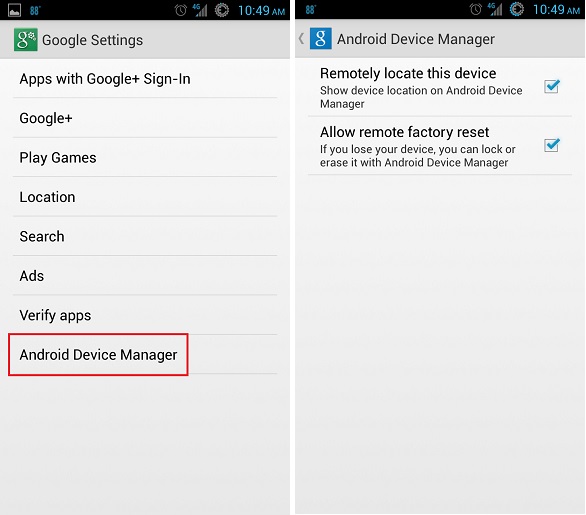
All you need to get Android Device Manager to work is to have the latest Google Play Services. You’ll know if you have it by checking in your apps under the “Google Settings” green icon. At the very bottom you should see the option for Android Device Manager. If you don’t have it then just install the latest Play Services apk file from here to upgrade. Once in Device Manager then simply check both “Remotely locate this device” and “Allow remote factory reset”. Then anytime you need to use the service just visit the web Android Device Manger to locate and wipe your device if needed. You can also make your device ring as well. It’s that simple and long overdue. Have fun and let us know if you have any questions.




Leave a Reply