Review of Tempo by BlueMaestro

More

Leo’s Fortune Review

More

Get better control of your kids tablet with Screen Time

More

Review of the Blackwell series from WadjetEye Games

More

Android Cowboy

  • Apps
  • Devices
  • Kindle
    • Kindle Devices
    • Kindle Apps
    • Kindle Rooting
  • Guides
  • News
  • Indie Corner
  • Home
  • Get in touch with us
    • Advertise with us or have your app reviewed
    • Write for us
    • General Contacts
  • Android APK Downloads
  • OliverMarshall.net

Android Device Manager: Remote Locate and Wipe Your Device

I’m sure we have all been there at some point when we have either lost or can’t find our phone or tablet. It could be somewhere in the house or maybe it was lost last night along with other things you don’t remember. In these cases you want to protect your data and being able to locate or remote wipe is very important. There are definitely apps that will do this but Google has finally released their own software called Android Device Manger. It’s a simple Google Maps type interface that let’s your locate and remote wipe your device. It’s long overdue but we are glad it’s finally here. So how do you get this on your device. Follow our instructions below.
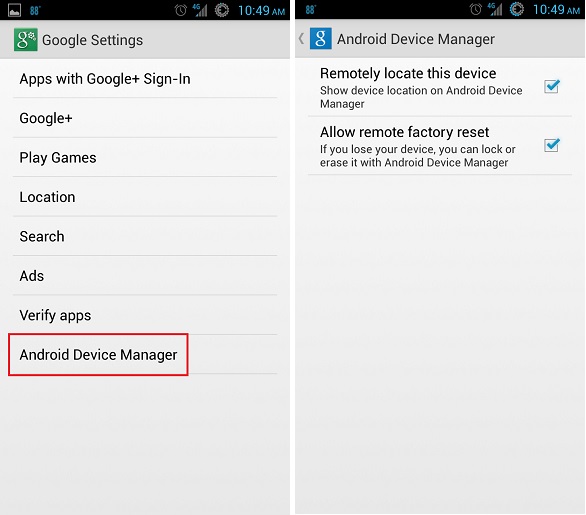
android-device-manager-1

All you need to get Android Device Manager to work is to have the latest Google Play Services. You’ll know if you have it by checking in your apps under the “Google Settings” green icon. At the very bottom you should see the option for Android Device Manager. If you don’t have it then just install the latest Play Services apk file from here to upgrade. Once in Device Manager then simply check both “Remotely locate this device” and “Allow remote factory reset”.  Then anytime you need to use the service just visit the web Android Device Manger to locate and wipe your device if needed. You can also make your device ring as well. It’s that simple and long overdue. Have fun and let us know if you have any questions.


Aug 8, 2013Arash Soheili
Mi Cable Tidy ReviewCheapCast: Chromecast Emulator on Any Android Device

Leave a Reply Cancel reply

Arash Soheili

Arash is the founder of Android Cowboy and all around tech enthusiast. He currently carries the Nexus 5, Kindle Fire HDX, and Nexus 7 FHD tablet. He's also a Google Glass explorer!!

12 years ago News
0
GooglePlus
0
Facebook
0
Twitter
0
Stumbleupon
0
Pinterest
Recent Articles
Lumberyard is safe to use in the event of a zombie outbreak
10 years ago
Amazon introduces Lumberyard, a free cloud aware game engine.
10 years ago
5 of the best new features in Android 5 Lollipop
11 years ago
Search
About

Android Cowboy

Serving up the daily Android and Kindle news, reviews and guides
Search
Recent Posts
Lumberyard is safe to use in the event of a zombie outbreak
10 years ago
Amazon introduces Lumberyard, a free cloud aware game engine.
10 years ago
Subscribe

Sign up for our newsletter to receive the latest news and event postings.

2014 © Android Cowboy
Go to mobile version