

The Liquid Z5 is one of several Acer phones aimed at the budget concious consumer. Over here in the UK it’s sold by Asda and Amazon (what isn’t).
Look and feel
The Acer Liquid Z5 is a decent looking phone. The first thing you notice is the whopping 5″ screen. It’s a pretty weighty device as well and you notice every bit of its 150 grams. That being said, I don’t mind heavy phones, all the better to feel that it’s still in your pocket.

Liquid Z5 (bottom) compared to a Nexus 5 (above)
The case itself feels sturdy, if a bit a on the plasticy side, which is understandable on a budget smartphone. However it’s not enough to put you off the phone itself. Samsung phones have long been receiving comments about the plasticy nature of their cases, and it’s not been enough to put any of us off them so far. One the rear of the phone you get the usual lense and flash, along with a button that plays or pauses the current track in Google Play Music.

Acer Liquid Z5 and Nexus 5 side by side
The screen, which as I mentioned above is a good size, does suffer from a low resolution at 196 dpi. This is mostly noticeable when you put the Liquid Z5 along side a higher priced phone such as a Nexus 5 or a Samsung S4 or S5. Despite the low resolution the screen is bright and clear and certainly usable.
Overall it looks and feels pretty chunky and solid. The side mounted microSD card slot has a reasonably solid cover on it, though my experience is that the covers for these types of slots will break at some point no matter how robust.
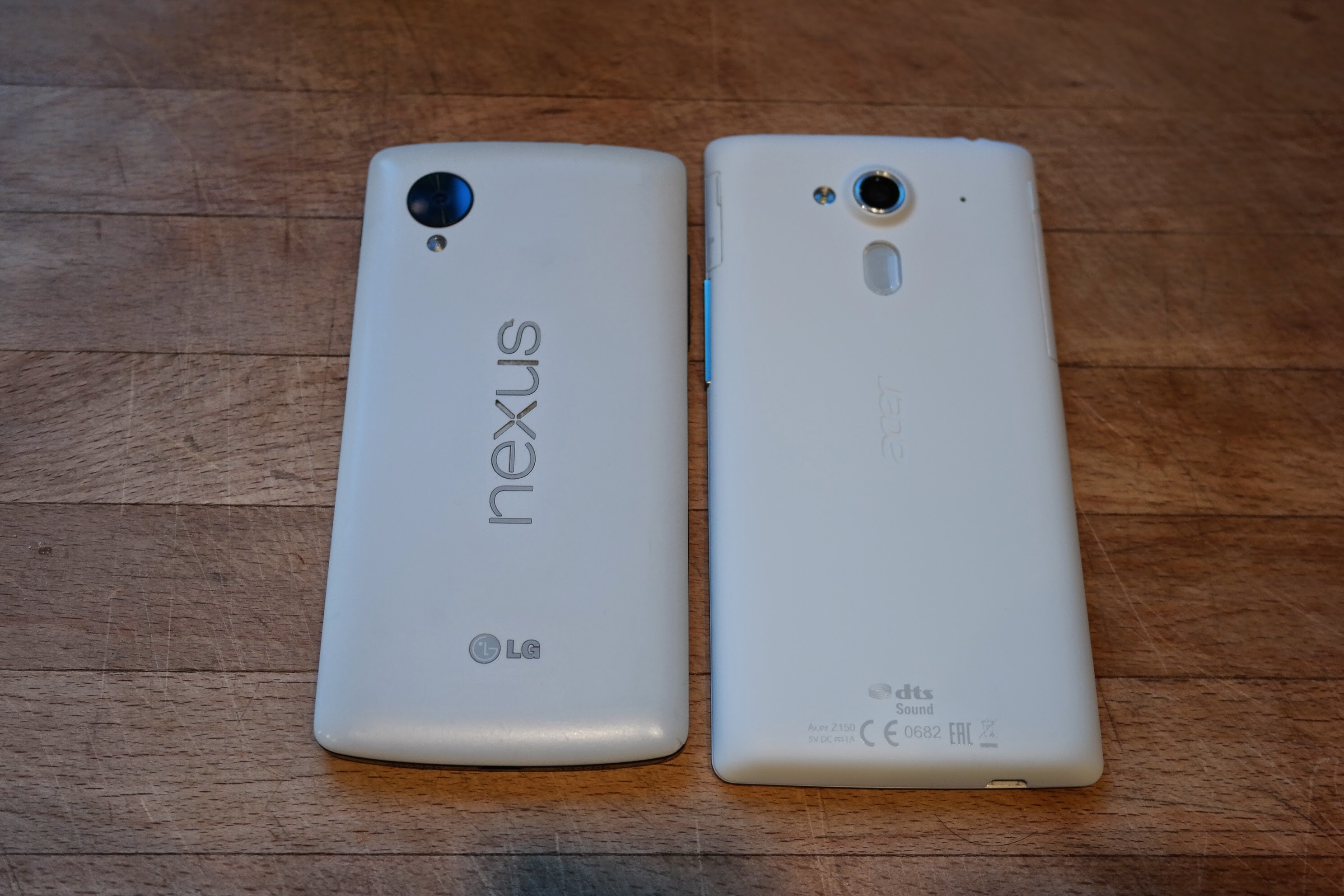
Acer Liquid Z5 and Nexus 5 rear comparison
Specifications and hardware
It’s easy to see why the Acer Liquid Z5 is so cheap when you start to use it. The performance really isn’t spectacular. Inside you have a 1.3Ghz Cortex A7 processor with two cores. Compare this to something like the Nexus 5 (without doubt the finest phone ever!) which has a 2.3Ghz quad core processor and even on paper you can tell that it’s not going to be winning any speed races. Processor power should be taken with a pinch of salt. It’s not about how fast a phone is, it’s about context. If you are selling a phone to a young-adult market as a gaming device, power is everything. If you are selling something to an elderly market then processor power becomes less important and the focus is on ease of use. In this case, with a low DPI and a low budget, the Liquid Z5 isn’t aiming at winning awards. It’s looking to provide value for money and it does that well. Day to day surfing the web is fine and, yes, you might have to wait a few seconds for tabs and apps to load, but it gets there eventually.
The cameras are noticeably basic with the front facing one being of VGA resolution which equates to less than 1MP. The rear facing camera isn’t as bad, rolling in with a reasonable 5 mega pixels. The quality is also reasonable but it suffers in lower light levels and the screen doesn’t really do the photos justice.
Given the little play/pause button on the back of the phone I’d hoped that perhaps sound was going to be a focal point of this phone. It isn’t. Looking at the phone it’s easy to think that it has dual front facing speakers like the HTC One, but you would be wrong. Only one of the grills hides a speaker and the other, I’m guessing, hides the microphone. The audio itself is reasonable enough, albeit a bit tinny, and you’d certainly want to pick yourself up a bluetooth speaker if you wanted to listen to tunes. On that note, the phone comes with DTS sound ‘enhancement’. I have to say that to me all this does is make the sound louder. Turning off DTS just makes the maximum volume level really quiet.
| Internals | |
|---|---|
| CPU | Dual-core 1.3 GHz Cortex-A7 |
| GPU | Mali-400 |
| OS | Android OS, v4.2 |
| Cameras | |
| Rear facing camera | 5 MP, 2592 х 1944 pixels, LED flash#003 |
| Front facing camera | <1MP (VGA) |
| Display | |
| Size | 5.0 inches (196 ppi pixel density) |
| Resolution | 480 x 854 pixels |
| Type | TFT Multitouch |
| Memory | |
| Amount | 512MB Ram, 4GB User |
| Upgradeable | MicroSD card slot up to 32GB |
| Sound | |
| Speaker | Single front facing |
| Headphone jack | 3.5mm |
Software
Every device comes shipped with third party software. We haven’t quite seen mobile devices get drowned in crap-ware as we’ve seen in the PC market but sometimes it can feel like. Luckily the software that comes with the Acer Liquid Z5 isn’t too invasive and in some cases actually adds decent features.
Along with a few handy apps, such as the file manager and torch, you also get Acers flavour of cloud offerings including abMusic, abVideo, and abFiles. Oddly these are delivered via the Acer Portal, which is just a page of links taking you to the Google Play store. It might have been more straightforward to just bundle these on the phone itself.
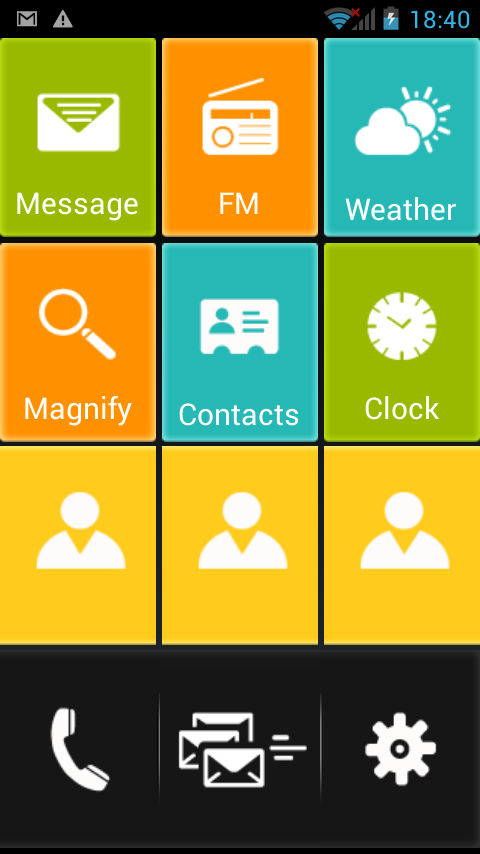
Senior mode in Quick Mode
One of the bundled apps which doesn’t get much exposure is Quick Mode. This provide a set of preconfigure dashboards which you can lock in place with a pin code. Each dashboard is configured with a set of tiles allowing the user quick access only to certain features. So, you might want to give your phone to an elderly relative and you can set the dashboard to Senior Mode which gives them big clear buttons for speed dials, messages and the brilliant magnify mode utilising the camera as a magnifying glass. This kind of feature is available from other apps but it’s good to see a vendor understanding the different uses that their device might have.
Our thoughts
The Acer Liquid Z5 offers some good features. Taken in context – an affordable phone with decent features – it does exactly what you would expect and you won’t be disappointed. Personally, I think it’s a great first Android smartphone or a great phone for senior members of the family who don’t want to get bamboozled by fancy features (Dad, I’m looking at you).
Look for it at Asda in the UK and you’ll get it for a great price and anyone you give it to won’t be disappointed (well they might, but kids are like that, aren’t they?).
[rwp-review id=”0″]